Note that Microsoft have broken a number of the links that used to be in this page. I will not be updating the links.
By following these 10 steps you can let me run Remote Desktop Sharing so that I can fix your PC. This is unneccessary when using Windows XP as it has a wizard to do all this for you - search the help for more information about "Remote Assistance".
- Firstly, download Netmeeting, the instructions should be fairly obvious, but it is usually best to download it onto your computer (it's fine to put it on your desktop) and then run it afterwards. Netmeeting is the program that controls the remote desktop sharing.
- Now install it by double clicking the file you downloaded. Then you can either { find the shortcut in "Start | Programs" } or { do "Start | Run" then type "conf" (no quotes) and hit enter}
- So now the wizard will ask you questions about how you want to install it. Most of them are irrelevant, but you should:
- Set the speed to 56Kbps modem (or something like that)
Ensure that it doesn't go to ils.microsoft.com when it starts up as it just makes it more complicated for you to setup.
- Then it will *eventually* be running.

- Now go to "Tools | Remote Desktop Sharing" and then go through the wizard - don't bother setting a screen saver password - life's too short. You may have to reboot at this point. If you do reboot then simply start up NetMeeting again.
- Next thing if to goto "File | Exit and activate Remote Desktop Sharing" which will allow me to get onto your machine.
- You should end up with something a bit like this in the bottom right corner of your screen:

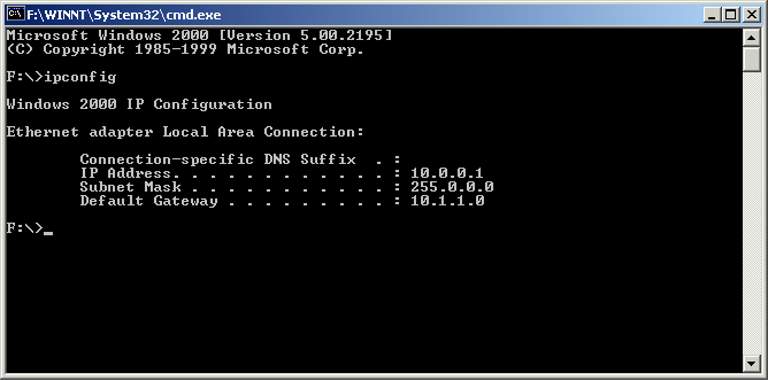
- The last computer thing to do is to do "Start | Run" and then "cmd" (no quotes). Then you will have a black box to type into - it will look like an old computer. Type "ipconfig" (no quotes) and write down the value of the "IP Address". This tells my computer how to find yours. In this example my IP Address is 10.0.0.1 (yours should be different)
- Now phone me and tell me your IP Address value.
- Now I can come and do stuff!